
#14 産業連関表をデータフレーム形式で読み込む/Reading Input-Output Tables into DataFrames
 宮崎 稔也
宮崎 稔也An English translation of this article is provided at the bottom of the page.
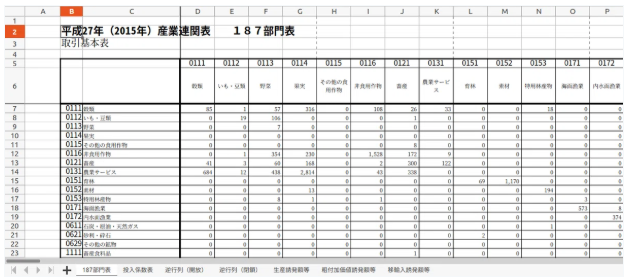
今回は、和歌山県の産業連関表(187部門表)をデータフレーム形式で読み込むことに挑戦します。
和歌山県産業連関表はエクセル形式で、こちらからダウンロードできます。
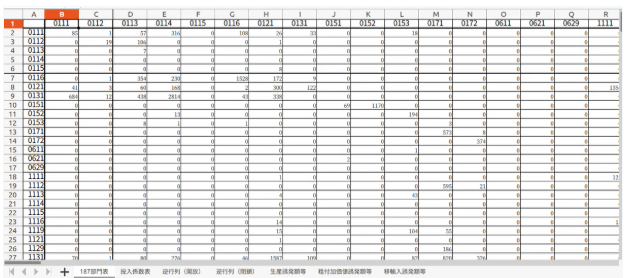
こんな感じです。
このエクセルファイルを少しいじってから、CSV形式していこうと思います。
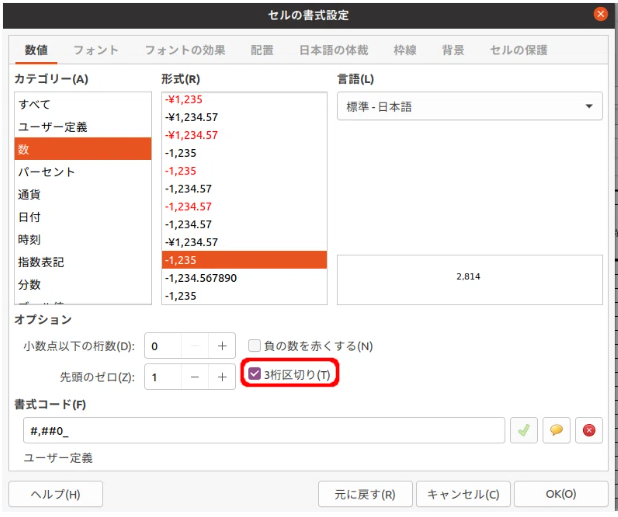
書式設定の3桁区切りを外す
まず、「セルの書式設定」で、「3桁区切り」にチェックが入っているので、そのチェックを外します。
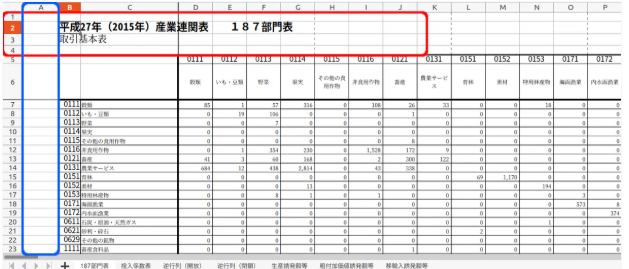
空行・空列を削除
次に、行1〜4と列Aを削除します。
ファイル名を「wayakama_IO.csv」として保存します。
保存したwakayama_IO.csvをデータフレーム形式で読み込んでみます。
df_iotable = pd.read_csv('wakayama_IO.csv')
df_iotable.head()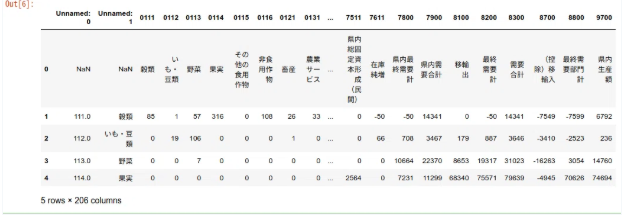
う〜ん。
イメージしていたものと違う…
部門名の行と列をそれぞれ削除してみた
エクセルファイルに戻って、セルの書式設定と行1〜4、列Aを削除し、続いて部門名の行と列をそれぞれ削除してみました。
もう一度、CSVファイルに変換して、データフレーム形式で読み込むことにします。
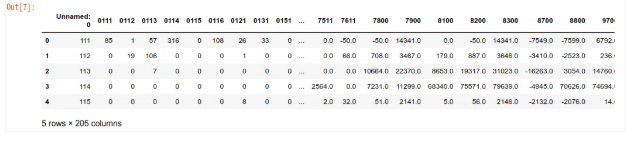
うーん。
2列目の分類コードが、テキストではなく数値と解釈されたようですね。
なので、文字列に変換してみます。
df_iotable = df_iotable.rename(columns={'Unnamed: 0':'分類コード'})
df_iotable['分類コード'] = df_iotable['分類コード'].astype('str')
for i in range(len(df_iotable)):
   if len(df_iotable['分類コード'][i]) == 3:
       df_iotable['分類コード'][i] = '0' + str(df_iotable['分類コード'][i])
df_iotable.head()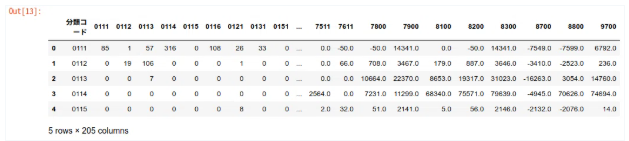
うーん。
前回の投稿での、重量単価表でもそうでしたが、本当は、分類コード(文字列)をインデックスにしたいんですよね。どうやればいいんだろう…
今日はもう時間が来たので、続きはまた明日にでも。
English translation part is here.
In this post, I will try loading the Wakayama Prefecture Input-Output Table (187-sector table) into a Pandas DataFrame.
The Wakayama Prefecture I-O table is available in Excel format and can be downloaded here.
It looks like this:
I'm going to tweak this Excel file a bit before converting it to CSV format.
Removing the 1000 Separator Formatting
First, I'll uncheck the "Use 1000 Separator (,)" option in the "Format Cells" settings.
Deleting Empty Rows and Columns
Next, I'll delete rows 1 to 4 and column A.
I'll save the file as "wakayama_IO.csv".
Now, let's try loading the saved wakayama_IO.csv into a DataFrame.
df_iotable = pd.read_csv('wakayama_IO.csv')
df_iotable.head()
Hmm...
This isn't exactly what I had in mind.
Trying to Delete Sector Name Rows and Columns
I went back to the Excel file, kept the changes (formatting and deleting rows 1–4/column A), and then tried deleting the rows and columns for the sector names as well.
I'll convert it to a CSV file again and try loading it as a DataFrame.
Hmm...
It seems the sector codes in the second column were interpreted as numbers instead of text.
So, I'll convert them to strings.
df_iotable = df_iotable.rename(columns={'Unnamed: 0':'Sector Code'})
df_iotable['Sector Code'] = df_iotable['Sector Code'].astype('str')
for i in range(len(df_iotable)):
   if len(df_iotable['Sector Code'][i]) == 3:
       df_iotable['Sector Code'][i] = '0' + str(df_iotable['Sector Code'][i])
df_iotable.head()
Hmm...
Just like with the "Unit Weight Table" in my previous post, what I really want to do is set the sector codes (as strings) as the index. I wonder how to do that...
I'm out of time for today, so I'll continue with this tomorrow.
Follow me!