
#13 重量単価一覧表をDataFrameとして読み込む/Loading the Weight Unit Price List as a pandas DataFrame
 宮崎 稔也
宮崎 稔也An English translation of this article is provided at the bottom of the page.
前回の投稿で、重量単価[初期値]の推計が完了しました。
今回からは、各産業の重量単価[初期値]をもとに産業連関表の金額フローを物量フローに変換していきます。
重量単価一覧表を読み込む
「重量単価初期値一覧.ods」をCSV形式で保存し、それをpandasで読み込みます。
import pandas as pd
df_price_per_ton = pd.read_csv('重量単価初期値一覧.csv', index_col=0)
df_price_per_ton.head()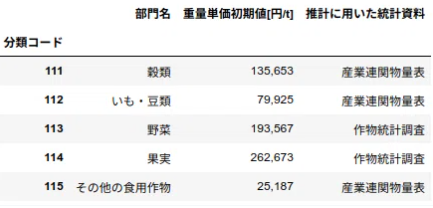
列名「重量単価初期値【円/t】」が冗長なので、列名を変更します。
こちらのサイトを参考にしました。
任意の行名・列名を変更: rename()
pandas.DataFrameのrename()メソッドを使うと任意の行名・列名を変更できる。
rename()メソッドの引数indexおよびcolumnsに、{元の値: 新しい値}のように辞書型dictで元の値と新しい値を指定する。
indexが行名でcolumnsが列名。行名・列名のいずれかだけを変更したい場合は、引数indexとcolumnsのどちらか一方だけを指定すればよい。
新たなpandas.DataFrameが返され、元のpandas.DataFrameは変更されない。
df_price_per_ton = price_per_ton.rename(columns={'重量単価初期値[円/t]': '重量単価'})
df_price_per_ton.head()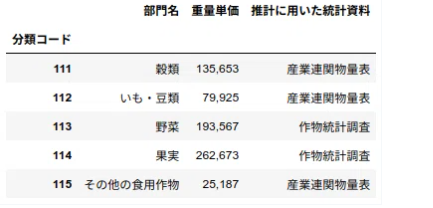
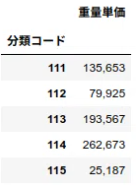
次に、列「部門名」、「推計に用いた統計資料」を削除します。
参考にしたのはこちらのサイト。
DataFrameの列を指定して削除
pandas.DataFrameの行・列を指定して削除するにはdrop()メソッドを使う。
バージョン0.21.0より前は引数labelsとaxisで行・列を指定する。
0.21.0以降は引数indexまたはcolumnsが使えるようになった。
df_price_per_ton = df_price_per_ton.drop('部門名', axis=1)
df_price_per_ton = df_price_per_ton.drop('推計に用いた統計資料', axis=1)
df_price_per_ton.head()
分類コードのデータ型を文字列に変換
df_price_per_ton['分類コード'] = df_price_per_ton['分類コード'].astype('str')
for i in range(len(df_price_per_ton)):
   if len(df_price_per_ton['分類コード'][i]) == 3:
       df_price_per_ton['分類コード'][i] = '0' + str(df_price_per_ton['分類コード'][i])
print(df_price_per_ton.dtypes)
df_price_per_ton.head()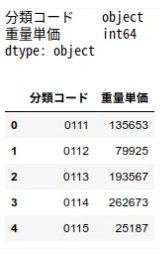
うーん。
これでいいのか、自信がありません。
分類コードのデータ型が、objectになっているし…
---
**An English translation part is here.**
In my previous post, I completed the estimation of the initial weight unit prices. From this post onward, I will begin converting the monetary flows in the Input-Output Table into physical (weight-based) flows, based on these initial unit prices for each industry.
### Loading the Weight Unit Price List
I saved the "Initial_Weight_Unit_Price_List.ods" in CSV format and loaded it using the pandas library.
```python
import pandas as pd
df_price_per_ton = pd.read_csv('Initial_Weight_Unit_Price_List.csv', index_col=0)
df_price_per_ton.head()
```
The column name "Initial Weight Unit Price [Yen/t]" is a bit redundant, so I decided to rename it. I referred to [this site](https://note.nkmk.me/python-pandas-dataframe-rename/) for the method.
### Renaming Specific Rows and Columns: rename()
> By using the rename() method of pandas.DataFrame, you can change specific row or column names. You specify the original and new values as a dictionary {original: new} for the index (rows) or columns arguments. A new DataFrame is returned, and the original remains unchanged.
```python
df_price_per_ton = df_price_per_ton.rename(columns={'Initial Weight Unit Price [Yen/t]': 'Unit_Price'})
df_price_per_ton.head()
```
Next, I removed the "Sector Name" and "Statistical Materials Used for Estimation" columns, referring to [this site](https://note.nkmk.me/python-pandas-drop/).
### Deleting Specific Columns from a DataFrame
> To delete rows or columns, use the drop() method. From version 0.21.0 onwards, you can use the index or columns arguments directly.
```python
df_price_per_ton = df_price_per_ton.drop(['Sector_Name', 'Source_Material'], axis=1)
df_price_per_ton.head()
```
### Converting the Classification Code Data Type to String
I also needed to ensure the classification codes were handled correctly as strings, specifically adding a leading zero for 3-digit codes.
```python
df_price_per_ton['Code'] = df_price_per_ton['Code'].astype('str')
for i in range(len(df_price_per_ton)):
if len(df_price_per_ton['Code'][i]) == 3:
df_price_per_ton['Code'][i] = '0' + str(df_price_per_ton['Code'][i])
print(df_price_per_ton.dtypes)
df_price_per_ton.head()
```
Hmm...
I'm not entirely confident if this is the best way to do it. The data type for the classification code shows up as "object," which leaves me a bit uneasy.
---
Follow me!