
#6 重量単価の初期値設定(1)と(2)をVBAで実現/Implementing Initial Weight Unit Price Settings (1) and (2) with VBA
 宮崎 稔也
宮崎 稔也An English translation of this article is provided at the bottom of the page.
今日から、各産業の重量単価[初期値]の推定に取り掛かります。その前に、前回作成した186部門の各シートに、
- 部門コード
- 部門名
- 重量単価[初期値]
を入力する2行×3列の表を作成しておきます。
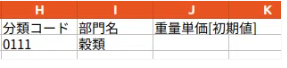
部門コードと部門名は、表「内生部門」からワークシート名と一致するものを順に読み込んで転記していきます。
セルの書式設定するNumberFormatLocal
作成したVBAプログラムは以下のようになります。
Sub 本番用()
    Dim bunruiCode As String
    For i = 10 To 195
            bunruiCode = Worksheets("内生部門").RANGE("G" & i).VALUE
        ' 1行目に列名を代入
        Worksheets(bunruiCode).Range("H1").Value = "分類コード"
        Worksheets(bunruiCode).Range("I1").Value = "部門名"
        Worksheets(bunruiCode).Range("J1").Value = "重量単価[初期値]"
        ' 2行目
        ' 部門コードが入るセルの書式設定を文字列に設定
        Worksheets(bunruiCode).Range("H2").NumberFormatLocal = "@"
        Worksheets(bunruiCode).Range("H2").Value = Worksheets("内生部門").Range("G" & i).Value
        Worksheets(bunruiCode).Range("I2").Value = Worksheets("内生部門").Range("H" & i).Value
    Next
End Sub
セルの書式設定に関する命令文、NumberFormatLocalというものを今回初めて使用しました。
部門コードが転記されるセルの書式を文字列に設定することで、先頭が「0」で始まるコードも「0」が省略されることなく転記することができました。
重量単価の初期値設定(1)と(2)
産業内製品の生産単位が全て[t]または[g],[kg]の場合、[g],[kg]は[t]に変換して算出します。算出式は以下のようになります。
$$
Ux = Mx / Tx
$$
Ux : x産業の重量単価[円/t]
Mx : x産業の総生産額[円]
Tx:x産業の総生産量[t]
ニット生地を例にとって、1)の方法での重量単価[初期値]の設定方法を示すと以下のようになります。
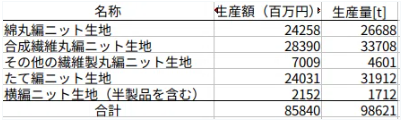
ニット生地の重量単価[初期値]は、85,840[百万円] ÷ 98,621[t] =885,779[円/t]となります。
重量単価[初期値]の算出が終わったシートはわかりやすいように、緑色にシートの色を変更することにします。
2)産業内製品の生産単位の一部が[t]または[g],[kg]の場合、その一部のみを用いて1)と同じように推計しました。
パルプを例に取って、2)の方法で重量単価[初期値]の設定方法を示すと、以下の表のようになります。
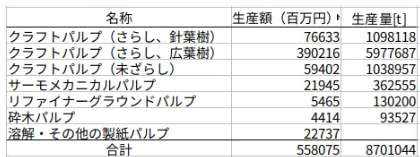
砕木パルプ以外の製品についてはすべて生産単位が[t]なので、パルプの重量単価は、558,075[百万円] ÷ 8,701,044[t]=64,139[円/t]となります。重量単価[初期値]の推定が完了したので、パルプのワークシートも緑色に変更します。
学生時代の過ちを繰り返すのか…
とワークシート1枚ずつ、手計算で重量単価[初期値]を算出していたのですが、途中でハッと気づきました。
「学生時代と同じことやっとる!」
というわけで、上述の1)と2)を自動で計算するVBAを組むことにしました。
例のごとく、プログラムを組むことに夢中になって、経過を端折ってます。
Sub 本番用()
    ' 重量単価【初期値】を自動計算する
    Dim bunruiCode As String
    Dim totalWeight As Double
    Dim totalPrice As Double
    Dim weightUnitPrice As Double
    For cnt = 10 To 195
        bunruiCode = Worksheets("内生部門").RANGE("G" & cnt).VALUE
        weightUnitPrice = 0
        totalWeight = 0
        totalPrice = 0
        For i = 2 To 1000
            If Worksheets(bunruiCode).Range("C" & i).Value = "t" Then
                totalWeight = totalWeight + Worksheets(bunruiCode).Range("D" & i).Value
                totalPrice = totalPrice + Worksheets(bunruiCode).Range("F" & i).Value
            ElseIf Worksheets(bunruiCode).Range("C" & i).Value = "kg" Then
                totalWeight = totalWeight + Worksheets(bunruiCode).Range("D" & i).Value / 1000
                totalPrice = totalPrice + Worksheets(bunruiCode).Range("F" & i).Value
            ElseIf Worksheets(bunruiCode).Range("C" & i).Value = "g" Then
                totalWeight = totalWeight + Worksheets(bunruiCode).Range("D" & i).Value / 1000000
                totalPrice = totalPrice + Worksheets(bunruiCode).Range("F" & i).Value
            End If
        Next
        If totalWeight = 0 Then
                GoTo Continue
        End If
        weightUnitPrice = totalPrice * 1000000 / totalWeight
        Worksheets(bunruiCode).Range("J2").Value = weightUnitPrice
    Continue:
        Next cnt
End Sub
Goto文を使って擬似的にcontinueする
最初、totalWeightが0のときに、continueするコードを書いておらず、0除算エラーに出くわしました。
グーグル検索した結果、GoTo文を使えば、Pythonのcontinueのようにループを1回スキップできることがわかりました。
が、Continue先の記述(Continue:)がよくわからず、解決に時間を要しました。
また、1つのワークシートで、重量単価[初期値]を算出した後に、totalWeight,totalPrice, weightUnitPriceを0で初期化する必要があることにも、後になってようやく気づきました。
あと、残念なことに、重量単価[初期値]を算出し終えたワークシートのタブの色を緑色に変更するVBAは、LibreOfficeでは未実装ということで実現できませんでした…
English Transtlation Part
Today, I’ll begin estimating the [initial] weight unit price for each industry. Before diving in, I’m preparing a 2x3 table in each of the 186 sector sheets created previously to input the following:
- Sector Code
- Sector Name
- Weight Unit Price [Initial Value]
I will sequentially read the sector codes and names from the "Internal Sectors" table that match the worksheet names and transfer them.
Setting Cell Format with NumberFormatLocal
The VBA program I created is as follows:
Sub Production()
    Dim bunruiCode As String
    For i = 10 To 195
        bunruiCode = Worksheets("InternalSectors").RANGE("G" & i).VALUE
        ' Assign column headers to the first row
        Worksheets(bunruiCode).Range("H1").Value = "Classification Code"
        Worksheets(bunruiCode).Range("I1").Value = "Sector Name"
        Worksheets(bunruiCode).Range("J1").Value = "Weight Unit Price [Initial]"

        ' Second row
        ' Set the cell format for the sector code to Text
        Worksheets(bunruiCode).Range("H2").NumberFormatLocal = "@"
        Worksheets(bunruiCode).Range("H2").Value = Worksheets("InternalSectors").Range("G" & i).Value
        Worksheets(bunruiCode).Range("I2").Value = Worksheets("InternalSectors").Range("H" & i).Value
    Next
End Sub
This was my first time using the NumberFormatLocal command for cell formatting. By setting the format to "Text" (@), I was able to transfer codes starting with "0" without the leading zero being omitted.
Setting Initial Weight Unit Price: Methods (1) and (2)
(1) If all production units within an industry are [t], [g], or [kg]:
I convert [g] and [kg] into [t] for the calculation. The formula is as follows:
$$Ux = Mx / Tx$$
- $Ux$: Weight unit price of industry $x$ [Yen/t]
- $Mx$: Total production value of industry $x$ [Yen]
- $Tx$: Total production volume of industry $x$ [t]
Using "Knitted Fabrics" as an example, the process for setting the initial value using method (1) looks like this:
The initial weight unit price for knitted fabrics is:
85,840 [Million Yen] ÷ 98,621 [t] = 885,779 [Yen/t].
Once a sheet is calculated, I decided to change the tab color to green to make it easily identifiable.
(2) If only some production units are [t], [g], or [kg]:
I estimate the price using only those specific items, similar to method (1). Taking "Pulp" as an example:
Since the production units for all products except groundwood pulp are [t], the unit price for pulp is:
558,075 [Million Yen] ÷ 8,701,044 [t] = 64,139 [Yen/t]. Having completed the estimation, I'll change the pulp worksheet tab to green as well.
Am I Repeating My Past Mistakes?
As I was manually calculating the initial values sheet by sheet, I suddenly had a realization:
"I'm doing the exact same thing I did back in grad school!"
So, I decided to write a VBA macro to automate methods (1) and (2) described above. As usual, I got so caught up in the coding that I skipped documenting the interim steps.
Sub Production()
    ' Automatically calculate the Weight Unit Price [Initial]
    Dim bunruiCode As String
    Dim totalWeight As Double
    Dim totalPrice As Double
    Dim weightUnitPrice As Double

    For cnt = 10 To 195
        bunruiCode = Worksheets("InternalSectors").RANGE("G" & cnt).VALUE

        ' Initialize variables for each sector
        weightUnitPrice = 0
        totalWeight = 0
        totalPrice = 0

        For i = 2 To 1000
            If Worksheets(bunruiCode).Range("C" & i).Value = "t" Then
                totalWeight = totalWeight + Worksheets(bunruiCode).Range("D" & i).Value
                totalPrice = totalPrice + Worksheets(bunruiCode).Range("F" & i).Value
            ElseIf Worksheets(bunruiCode).Range("C" & i).Value = "kg" Then
                totalWeight = totalWeight + Worksheets(bunruiCode).Range("D" & i).Value / 1000
                totalPrice = totalPrice + Worksheets(bunruiCode).Range("F" & i).Value
            ElseIf Worksheets(bunruiCode).Range("C" & i).Value = "g" Then
                totalWeight = totalWeight + Worksheets(bunruiCode).Range("D" & i).Value / 1000000
                totalPrice = totalPrice + Worksheets(bunruiCode).Range("F" & i).Value
            End If
        Next

        ' Skip if total weight is 0 to avoid division by zero
        If totalWeight = 0 Then
                GoTo Continue
        End If

        weightUnitPrice = totalPrice * 1000000 / totalWeight
        Worksheets(bunruiCode).Range("J2").Value = weightUnitPrice

    Continue:
    Next cnt
End Sub
Simulating "continue" with GoTo Statements
At first, I encountered a "Division by Zero" error because I hadn't written code to skip the process when totalWeight was 0. A Google search revealed that I could use a GoTo statement to skip a loop iteration, similar to continue in Python. However, figuring out exactly where to place the Continue: label took some time.
I also realized later that it was essential to initialize totalWeight, totalPrice, and weightUnitPrice back to 0 after finishing each worksheet.
Unfortunately, it turns out that changing the worksheet tab color to green via VBA is not yet implemented in LibreOffice, so I couldn't realize that particular feature...
Follow me!


―単位換算値を用いて再計算―-300x169.png)
“#6 重量単価の初期値設定(1)と(2)をVBAで実現/Implementing Initial Weight Unit Price Settings (1) and (2) with VBA” に対して1件のコメントがあります。