
#4 Excel VBAで空白行を削除し、詰めていく/Deleting Blank Rows and Shifting Up in Excel VBA
 宮崎 稔也
宮崎 稔也An English translation of this article is provided at the bottom of the page.
個人研究にプログラミングを取り入れよう!
ということで、今日はExcelの空白行を削除し詰めていく作業を自動化するVBAプログラムを作成してみます。
やりたいこと
平成27年度兵庫県産業連関表 部門分類表の結合小分類(185部門)の空白行を削除し、詰めていく
以下が処理対象の表。
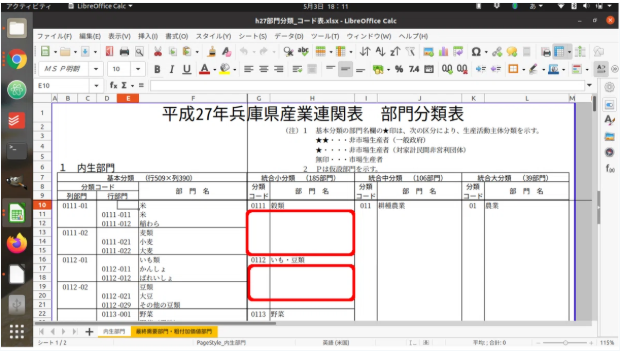
赤枠で囲った空白行を削除し、詰めていって185部門の表を作成することが今回の目標です。
ひとまず、A〜F列は非表示にします。
そして、以下のようなコードを書いてみました。
Sub 空白行の削除()
   Dim i As Long
   Dim toprow As Long
   Dim bottomrow As Long

   '開始する行
   toprow = 39
   '終了する行
   bottomrow = 493

   For i = bottomrow To toprow Step -1
       If ActiveSheet.Cells(i, 7) = "" Then
           'G列が空白なら行削除
           Application.Rows(i).Delete
       End If
   Next
End Sub
実行すると…
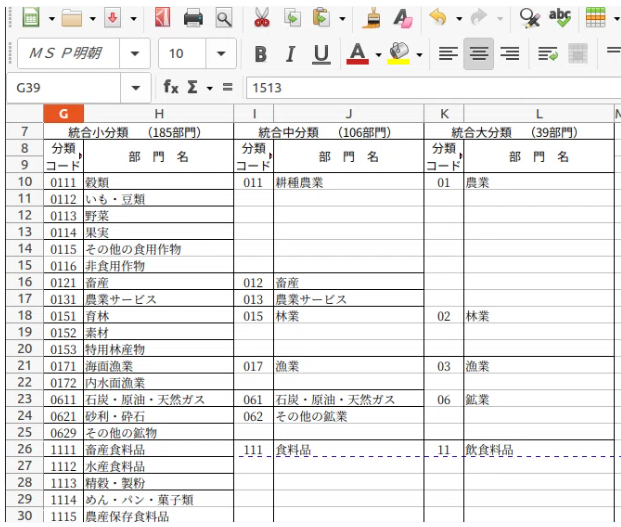
Excellent!
目標物が完成しました〜。
パチパチパチ♪
自動化・省力化を徹底する
修士課程時代は、上記の作業を自分の手で一つ一つ地道にやっていました。
当時は働いていなくて学業に専念できたがゆえに可能だったと思いますが、それでも「VBAの存在を知っていれば…」と感じてしまいますね。
今は社会人となり、学生時代の頃のように、多くの時間を研究に割く余裕はないので、自動化・省力化できるところはどんどんそうしていこうと思います!
Excel VBAやPythonを用いたプログラミングは絶賛学習中なので、最初は手作業でやった方が早いかもしれませんが^^;
English Translation
Incorporating Programming into Personal Research!
Today, I’m going to create a VBA program to automate the task of deleting blank rows and shifting the remaining data up in Excel.
What I Want to Achieve
In the "2015 Hyogo Prefecture Input-Output Table: Sector Classification Table," I want to remove the blank rows within the Combined Small Classification (185 sectors) to create a concise table.
Below is the target table:
The goal is to delete the blank rows outlined in red and shift the rows up to complete a clean table of the 185 sectors.
First, I will hide columns A through F.
Then, I wrote the following code:
Sub DeleteBlankRows()
    Dim i As Long
    Dim toprow As Long
    Dim bottomrow As Long

    ' Starting row
    toprow = 39
    ' Ending row
    bottomrow = 493

    ' Loop from bottom to top
    For i = bottomrow To toprow Step -1
        If ActiveSheet.Cells(i, 7) = "" Then
            ' If column G is blank, delete the entire row
            Application.Rows(i).Delete
        End If
    Next
End Sub
And the result is...
Excellent!
The final result is complete!
(Clap, clap, clap! ♪)
Commitment to Automation and Labor-Saving
During my Master’s program, I used to do this kind of work manually, one by one, with steady effort.
I suppose that was only possible because I wasn't working at the time and could focus entirely on my studies. Even so, I can't help but think, "If only I had known about VBA back then..."
Now that I'm working and don't have as much spare time for research as I did in my student days, I intend to automate and streamline as much as possible!
I'm still in the middle of learning Excel VBA and Python, so initially, it might actually be faster to do things manually... but I’ll keep at it! ^^;
Follow me!



“#4 Excel VBAで空白行を削除し、詰めていく/Deleting Blank Rows and Shifting Up in Excel VBA” に対して1件のコメントがあります。